A story about reading supplier documents, the accuracy we needed, and the workbench that got us there.
A wholesale company with tens of thousands of regulated products keeps adding, updating and removing items all the time. Before a product can be sold, the company needs to be sure the data the supplier provides is correct and valid, and only then is it updated in the system. Unfortunately, there are no sector-wide agreements on how suppliers should provide this information, so the company mostly relies on data taken from unstructured documents.
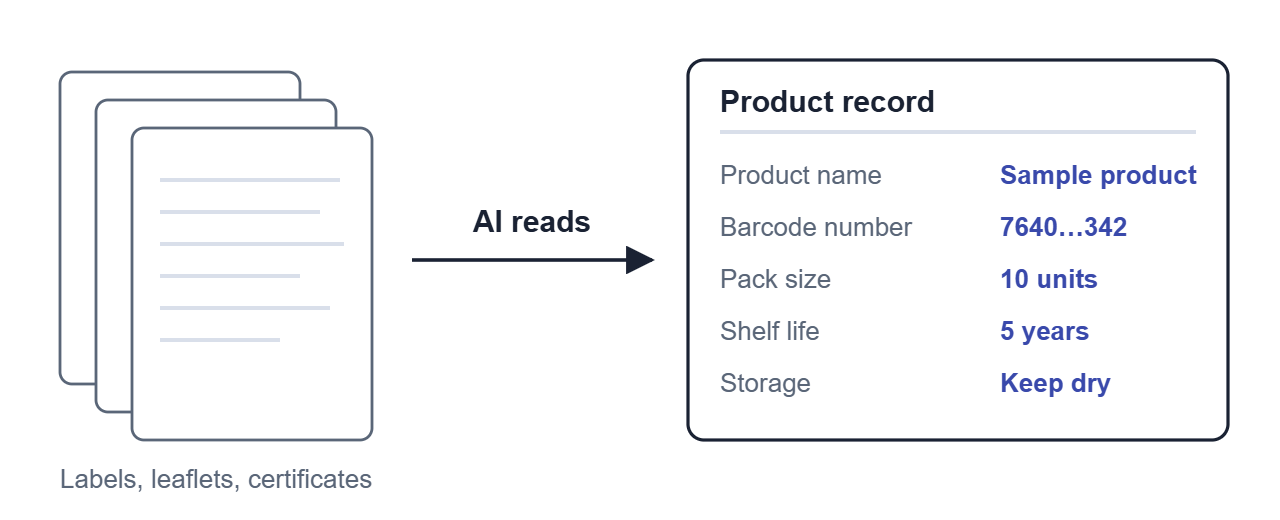
That data covers the different characteristics of a product, such as storage conditions, shelf life, size, weight and barcode numbers.
The data already exists. It sits in the supplier’s papers: the label on the box, the leaflet inside, certificates, data sheets. A person reads each one and types the values in. It is slow, and a single wrong digit in a barcode number can hold up a delivery or fail an audit.
We built an app to streamline this process, using AI to do the first read while a person checks the result. This post is about that first read, and about the day we stopped telling the AI exactly what to do.
The first version did exactly what we told it
Our first version worked like a factory line. We split the job into steps and chose the order: read the text on the page, look at the pictures, find the symbols, fill in the record. At each step the AI received a long set of instructions from us and handed one answer back.
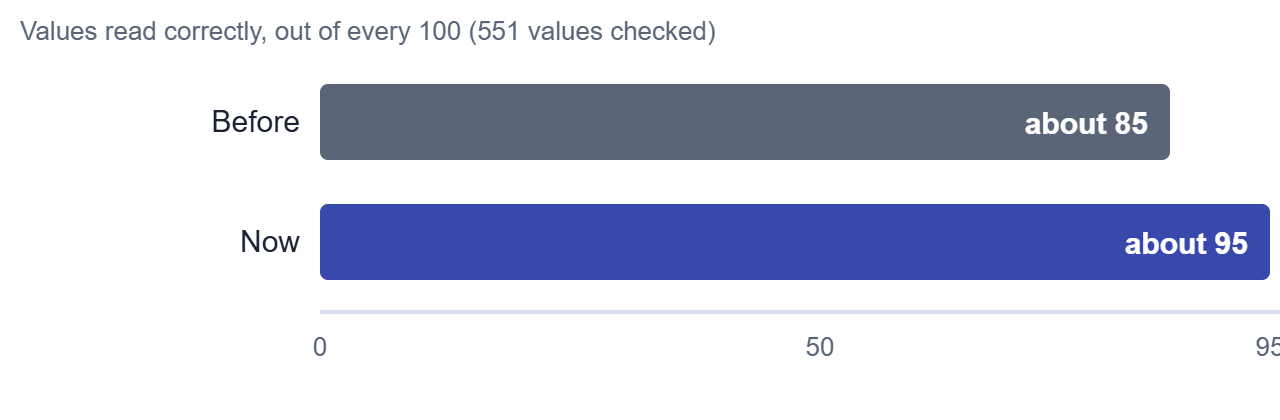
It worked, mostly. On a test set of 551 values, it got about 85 in every 100 right. That sounds fine until you remember what the data is for.
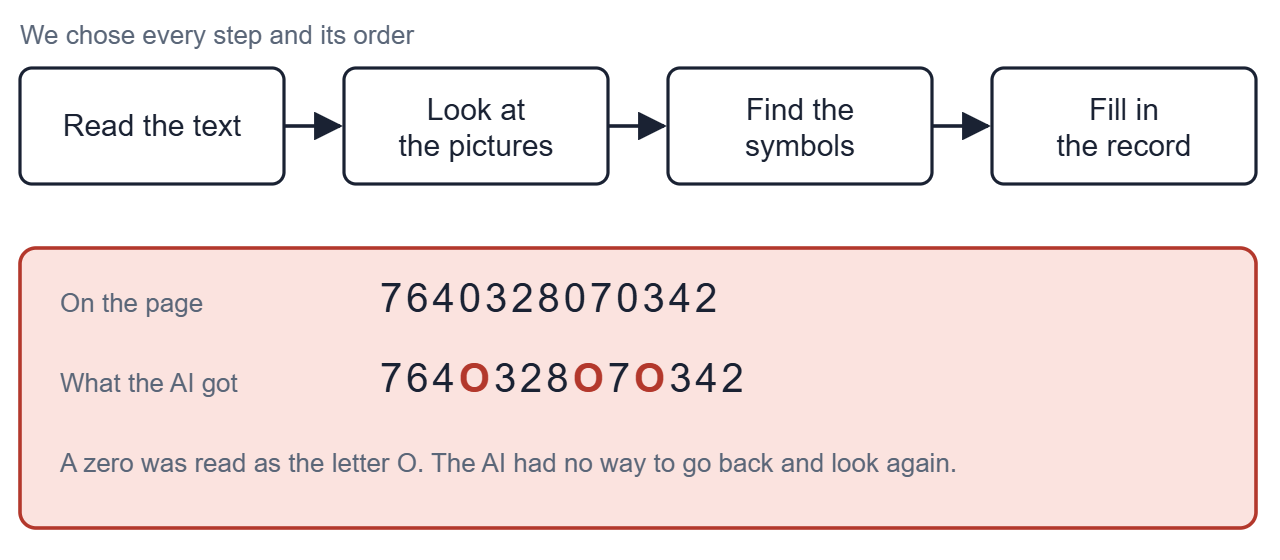
The AI never got a second look. If the scanned text turned a zero into the letter O inside a barcode number, there was no way to go back and check the page. It copied what it was given.
We fixed problems the way most teams do, by adding another rule to the instructions or another step to the line. The line kept growing. Separate steps sometimes disagreed with each other, and when a value was wrong, nothing told us how it had been found.
What if it worked like a new colleague?
At some point we asked a different question. When a new colleague joins, we don’t dictate every glance. We hand them the documents, show them where the tools are, explain the house rules, and ask them to show us how they got each answer.
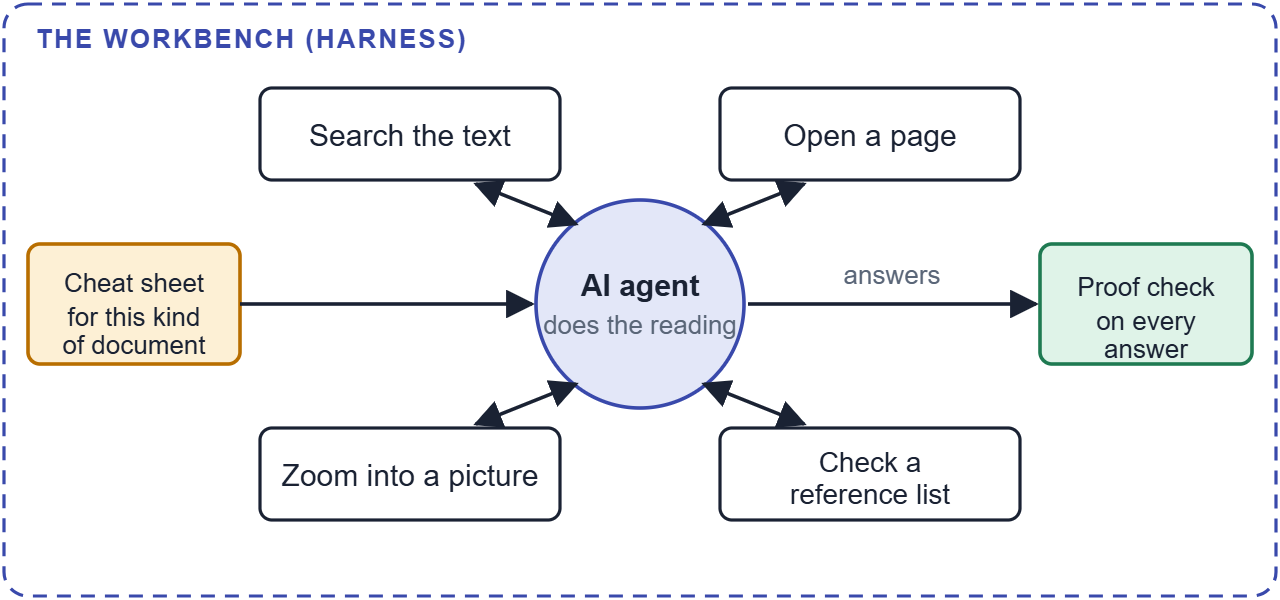
So that is what we built. The AI is now what people call an agent. It no longer answers once. It can search the text for a word, open a particular page, zoom into part of a picture, or check a reference list. It decides which of these to do, and in what order, and then hands in each answer one at a time.
Around the agent sits something engineers call a harness. Think of it as the workbench: the tools within reach, a cheat sheet for this type of document, a limit on how long one document may take, and a supervisor who asks for proof. The agent does the reading, and the workbench keeps it honest.
The rule that did the most: show me where it says that
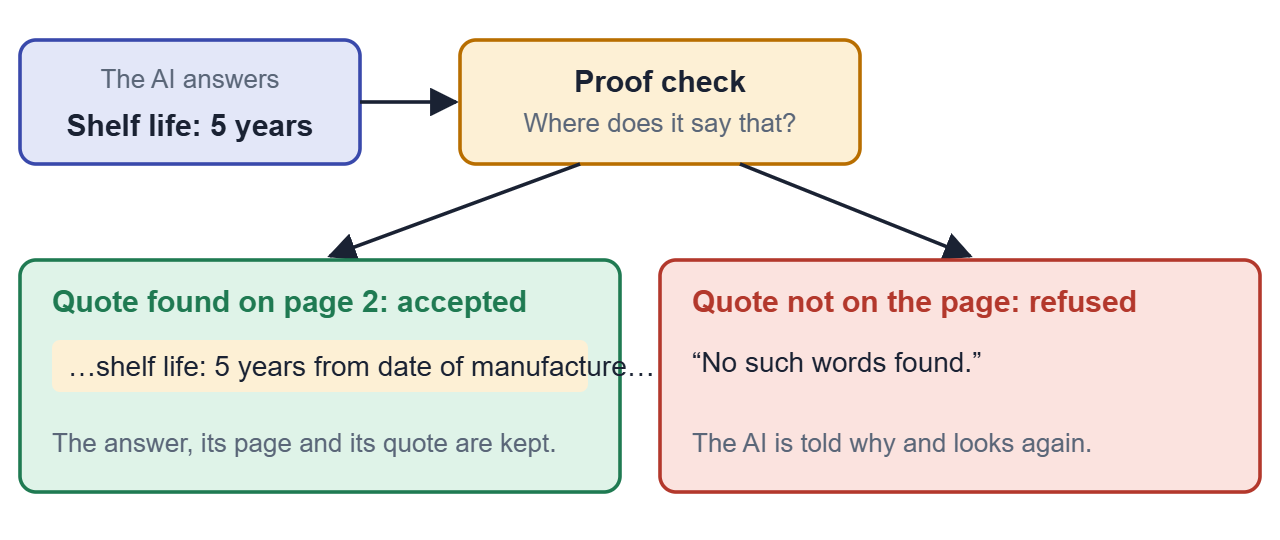
Every answer has to come with a quote from the document, and the workbench checks that the quote really appears on the page. If it doesn’t, the answer is refused, the AI is told why, and it tries again. A value that exists only as a picture, like a “keep dry” symbol, is handed in as a picture instead of words.
We used to write sentences like “never make up a value” into the instructions and hope for the best. A request in the instructions can be ignored, while a check cannot.
Some business rules went into the workbench the same way. Questions like “is it single use?” must be answered Yes or No, never “not present”. That one rule was worth about four points on one of the business team’s test sheets.
The cheat sheets are plain text that admins can edit on a page of the app, so a change doesn’t need a software release. Before publishing, an admin can try the new wording on a single document and watch what the AI does. Nothing is saved until they decide.
What changed in the numbers
We scored the old line and the new agent on the same 551 values. The old line got about 85 in every 100 right and the agent got about 95. On a second sheet of 201 checks written by the business team, the old line scored about 82 and the agent scored between 91 and 94.
The result we cared about most came from outside our own tests. The business team checked the values for a real product and confirmed that they were correct.
Two cautions. We wrote the cheat sheets after seeing errors on these same documents, so the score is a little flattering until we test on fresh ones. And from one run to the next, results move by about half a point, so we don’t read much into small differences.
A few other things got better along the way:
- The same agent now reads the symbols on labels, which used to be a separate step. It also draws a box around each one so a reviewer can see it. In our trial it found 104 of 106.
- It can guess what kind of file an upload is. On 85 sample files, 84 were right.
- A document takes about 37 seconds to read.
Things we tried that didn’t help
We added a second pass where the agent re-checked every number against the page. It changed about one value in 380 and the score didn’t move. We also tried giving one agent all the documents of one type to read together. Accuracy stayed the same and the cost went up by about 60 percent. Neither made it into the app.
The person still decides
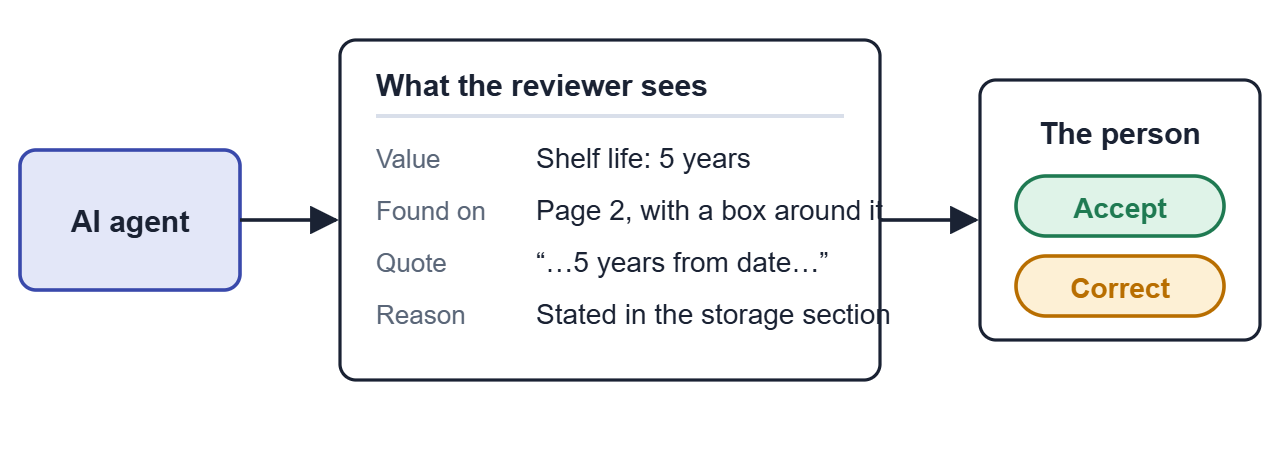
We didn’t want an AI that hides its work. For every value, the person reviewing sees the page, the quote, a box drawn around the spot, and a one-line reason. They accept it or correct it. When two documents disagree, the app points that out instead of picking a winner on its own.
For us this was the real change. Before, we controlled the AI tightly and the reviewer got an answer with no explanation. Now we give the AI room to work and the reviewer gets the evidence to decide.
Next: let corrections teach the system
Every correction a reviewer makes is a small lesson. Today the app stores it and applies it to that one case. We want the lesson to travel, so that the same error gets less likely on the next product.
The workbench idea makes this safer than it sounds. The AI’s instructions are plain text. We can read them, compare versions, test them and roll them back. Nobody has to retrain a model. This part is planned and not built yet, and a few questions are still open with the business team.
How each step works
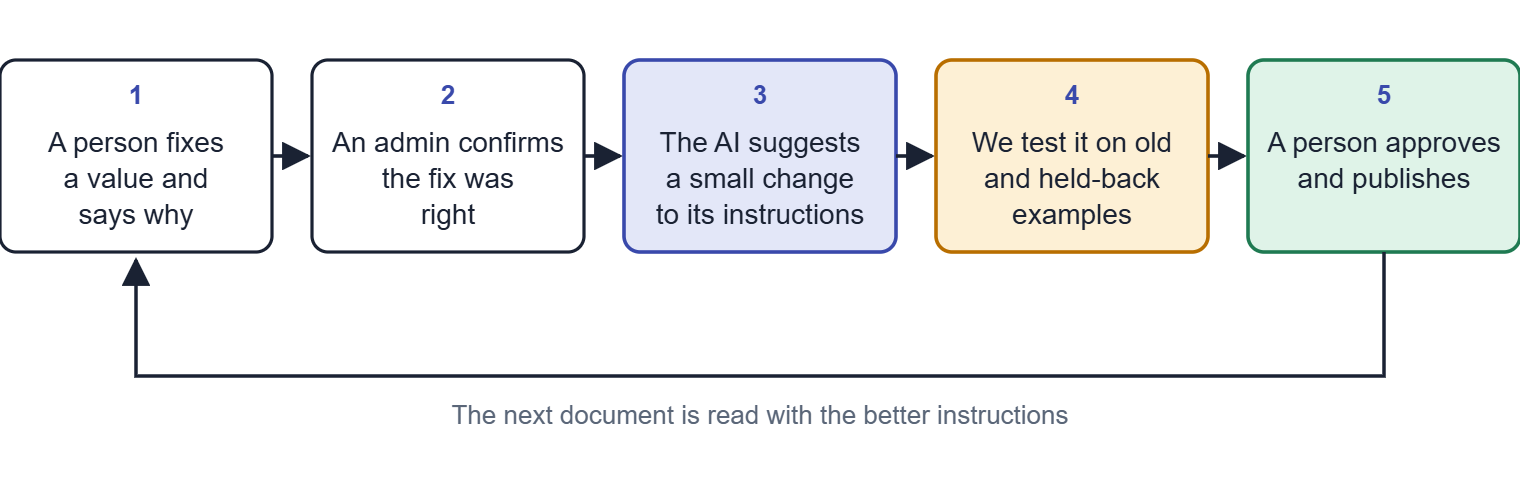
- Say why. When a reviewer corrects a value, they pick a reason: the AI misread it, the AI missed it, the document was unclear, or it is a business convention. Only the first two should change the AI’s instructions. A business convention goes on a separate list, because the AI isn’t wrong there. We just hadn’t told it.
- Confirm. One reviewer can be wrong, so an admin confirms each correction. Confirmed ones become verified examples. We hold back about a quarter of them and never show them to the part that suggests changes. It works like a surprise quiz, and it tells us whether the AI improved or only memorised the examples it saw.
- Suggest. After about three confirmed errors of the same kind (the number can be adjusted), the AI proposes a small edit to the instruction for that one field. One-off errors don’t trigger it. We don’t want a single odd document to rewrite the rules. The shared cheat sheets stay under human control.
- Test. The new wording has to fix the examples that failed and must not make any other example worse, including the held-back ones. A pass or fail table shows the result.
- Approve. An admin sees what changed and how it tested, then publishes. Nothing goes live automatically at the start, and one click returns a field to its built-in text.
After publishing we keep watching how often each field gets corrected. A falling rate means the loop works. A rising rate after a change tells us to roll it back.
We plan to build it in stages. The smallest piece comes first: correction reasons, a screen for confirming them, and a growing set of human-verified examples. That alone is useful, because our current answer key was mostly written by an AI from the source documents. Still to settle with the business: who may confirm a correction, how many errors should trigger a suggestion, and who supplies fresh documents for the held-back test.
What we would tell another team
- Give the AI tools to look again, before you write a longer prompt.
- If a rule really matters, enforce it with an automatic check. Asking the AI nicely in its instructions is not enough, because it can ignore a request.
- Keep instructions in a place where the business can read and edit them.
- Fail in the open. We removed the fallback to the old path, so if a document can’t be read, the run stops and names that document.
- Test whether a new step really helps before you keep it. Two of our ideas made no difference.
- Show the reasoning, so the person at the end can decide with evidence.
We began by controlling every step. We ended up controlling the edges: what counts as proof, what is off limits, how long a document may take. Inside those edges the AI reads the way a careful person would, and a person has the last word. Next we want the corrections to improve those edges over time.
Glossary
Master data. The official facts about a product that every system relies on: name, barcode, size, storage and so on.
Barcode number (GTIN). The number printed under a barcode. Each product, and each pack size of it, has its own.
AI model. The software that reads text and pictures and answers questions about them.
AI agent. An AI model that can take several steps and use tools, such as searching a document or zooming into a picture, instead of giving one answer straight away.
Harness (the workbench). Everything around the agent: its tools, its instructions, its limits and the checks on its answers.
Cheat sheet (playbook). Written guidance for one kind of document, such as “how to read a product label”. Admins can edit it without a software release.
Proof check. The rule that every answer must come with a quote that really appears in the document.
Scanned text. Text that software pulls out of a photo or scan of a page. It can contain small errors, like a zero read as the letter O.
Answer key. A list of values we know are correct, used to score the AI. Think of the answers at the back of a textbook.
Held-back examples. Corrected examples we keep hidden while improving the instructions, so we can test the improvement fairly.
Accuracy. How many values the AI read correctly, out of every 100 we checked.
Audit. A review by an authority or an internal team that checks the company kept correct records.
Numbers in this post come from our own tests on sample product documents.


Leave a Reply